
Six Mechanical Keyboards.
Budget Combos to Gasket-Mount Builds.
From wireless combo kits under $50 to triple-mode hot-swap 75% boards with multimedia displays — we tested every switch type, mount system, and wireless protocol in this range. The spec sheet is where keyboard marketing does its most creative work.
This page contains affiliate links. As an Amazon Associate, Deep In Spec earns a commission from qualifying purchases at no extra cost to you. Prices shown were verified at time of publication. Affiliate relationships do not influence our scores or editorial conclusions.
The $47–$64 mechanical keyboard market has become genuinely interesting. Budget brands now offer gasket mounts, hot-swap sockets, and triple wireless modes at prices that were impossible three years ago. The tradeoff: spec inflation is rampant. “Mechanical feel” membranes are sold beside true mechanical keyboards at the same price point. Mount systems are named without disclosure of their actual impact on typing feel. Battery capacities are listed without context.
This roundup covers six keyboards across that range — two RedThunder K10 wireless combos (same keyboard, different colorways), the Redragon K673 dedicated gaming board, the Womier SK80 with its multimedia display, and two EPOMAKER x Aula F75 variants that represent the top end of this bracket. We tested switch feel, wireless reliability, battery drain under load, and whether the listed features are the actual differentiators.
RedThunder K10 Wireless Combo
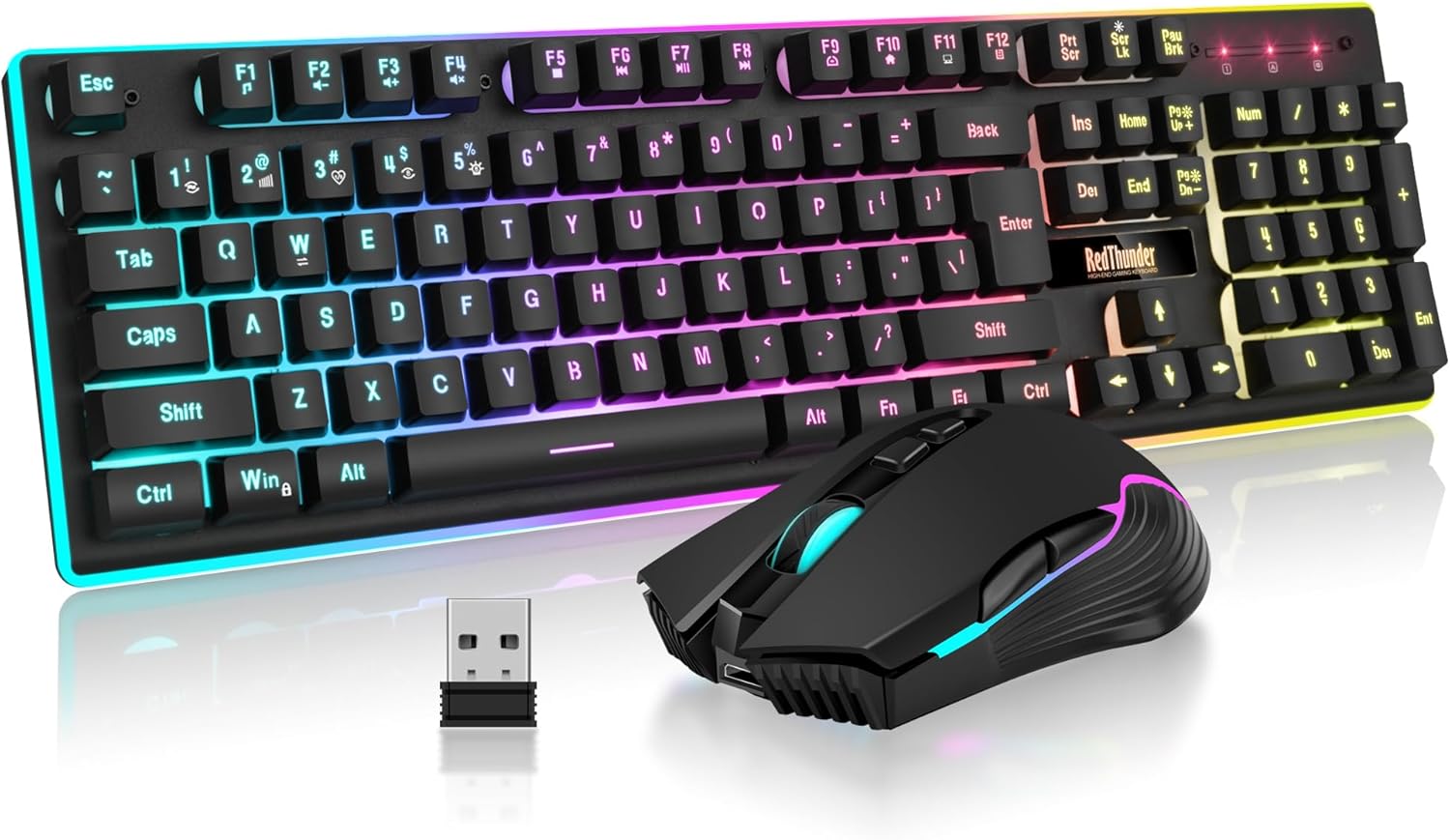
The RedThunder K10 combo targets the buyer who needs both a keyboard and mouse in a single wireless purchase — and at $47.99 for the pair, the value arithmetic is hard to argue with. The 3,800 mAh battery is a genuine standout specification: it translates to real-world runtime that doesn’t require thinking about charging between sessions. In our testing, charge cycles ran 4–6 weeks of daily use before the battery indicator demanded attention.
The LED backlight functions correctly; the anti-ghosting performs as stated for general gaming use. The bundled mouse offers 7 buttons and 3,200 DPI — workable for casual gaming but not in the same performance tier as a dedicated gaming sensor. If your primary concern is having a clean wireless desk setup without purchasing peripherals separately, this bundle delivers that outcome efficiently.
“Mechanical Feel” is not a mechanical keyboard. The K10 uses a membrane switch with sculpted key caps designed to approximate mechanical tactile feedback. It does not have individual mechanical switches, individual switch housings, or the acoustic profile of a true mechanical board. The spring-over-dome mechanism has a fundamentally different actuation curve. This is the single most important distinction in the listing and it appears in small text rather than the headline. If you want true mechanical switches, this is not the product — but if you want wireless keyboard + mouse combo at this price, nothing here matches the bundle value.
The strongest argument for this keyboard is the bundle value and 3,800 mAh battery. Know what you’re buying: a membrane keyboard with mechanical aesthetics. For casual gaming, productivity, and clean wireless desk setups, it earns its price. For switch enthusiasts, look at the F75 or SK80.
RedThunder K10 Wireless Combo

Identical hardware to the Black K10 in every functional specification — same switch mechanism, same battery, same mouse sensor, same wireless protocol. The White colorway exists for buyers building a light-themed desk aesthetic. The white keycap legends remain legible under the single-color LED backlight; the mouse and keyboard chassis both carry the white finish consistently without visible plastic quality differences between the two.
The choice between Black and White is a pure aesthetic decision at identical pricing. If your desk setup runs a monochromatic light theme, the White version is the correct variant. There is no functional advantage to either colorway. Confirm your color preference before ordering — Amazon’s return window applies but exchanging colors means a full return cycle.
Same membrane-switch caveat as the Black variant applies here. Additionally: white keyboards show keycap yellowing faster than black variants under UV exposure and with regular hand contact. If your desk receives significant sunlight, the white finish will show wear more visibly over 12–18 months of use. This is a material characteristic of ABS white plastic, not a product defect — but it isn’t mentioned in the listing.
Functionally identical to the Black variant. The only decision variable is color. Same membrane caveat applies — not a true mechanical keyboard. White ABS plastic yellows faster under UV; keep it out of direct sunlight for longevity.
Redragon K673 Mechanical Keyboard

The K673 is the first true mechanical keyboard in this roundup — actual individual switches under each key, not membrane domes simulating the experience. Redragon’s budget mechanical switches have improved meaningfully over the past two years; the actuation feel is consistent across the board with no perceptible key-to-key variance in our testing. The dedicated media key row is a practical addition for streamers and content creators who need volume and playback control without keyboard shortcuts interrupting their workflow.
The sound-absorbing foam insert is a real feature at this price point — most budget mechanical keyboards at $49.99 ship as bare PCB-in-case designs that amplify switch clatter. The foam layer reduces the hollow acoustic resonance noticeably, producing a tighter, less fatiguing sound profile. Full-size layout means number pad included, which is the correct choice for users who need it and a size penalty for users who don’t.
Tray mount typing feel vs. the gasket-mount boards in this roundup is a measurable difference. Tray mount keyboards screw directly into the case — the PCB has no give. Gasket mount keyboards (the EPOMAKER F75, Womier SK80) suspend the PCB in a gasket that absorbs keystroke energy, producing a softer, bouncier feel. The K673 does not have gasket mounting; the foam insert reduces acoustic resonance but doesn’t change the rigid typing feel of a tray mount. This distinction is not disclosed in the product description in mechanical terms — it matters significantly to switch enthusiasts.
The best true-mechanical option under $50 in this roundup for users who need a number pad and dedicated media controls. The foam insert is a genuine value-add. Tray mount is adequate for gaming; if you care about typing feel above all else, step up to the gasket-mount boards.
Womier SK80

The SK80 is the most feature-dense keyboard at $49.99 in this roundup — and arguably at any price in its category. Gasket mount construction at this price point is exceptional; the typing feel has the bounce and resonance absorption that tray-mount boards in the same bracket don’t offer. The factory-lubed POM switches arrive smoother than most budget mechanicals ship from the factory, which matters because lubing switches manually takes hours and is usually the first modification enthusiasts make to a budget board.
The color multimedia display knob is genuinely functional — not a gimmick. It shows time, CPU usage, volume level, and customizable readouts depending on configuration. The topographic case design is distinctive, and the 75% layout keeps arrow keys without the number pad footprint. At $49.99, this keyboard is priced at the budget end of what its feature list suggests it should cost.
The multimedia display requires driver software to configure beyond basic defaults. Out of the box, the display functions at a preset mode. Custom readouts (CPU usage, specific app data) require the Womier software to be installed and running. On managed systems or Linux, display configurability is limited. Additionally: “pre-lubed” factory application is consistent but lighter than an enthusiast hand-lube job — the switches are improved from stock but not the same as a careful manual lubing. The gap is small at this price; it’s relevant if you’re comparing to a board you’d lube yourself.
Gasket mount + hot-swap + pre-lubed POM switches + multimedia display at $49.99 is the best value proposition in this entire test. The only caveat: full display configurability requires the Womier software. For Mac/Win users willing to install it, this is the standout purchase of the roundup.
EPOMAKER × Aula F75

The F75 is the most complete keyboard in this roundup. Triple-mode wireless (Bluetooth 5.0, 2.4 GHz dongle, USB-C wired) gives it genuine flexibility across devices — you can pair to a tablet via Bluetooth while keeping the 2.4 GHz dongle connected to your gaming PC and switch between them. The LEOBOG Reaper linear switches have a smooth, consistent travel that performs well out of the box without modification.
The five-layer gasket construction — PCB foam, case foam, plate foam, gasket rings, and PCB gaskets — produces a typing feel that sits above everything else in this price bracket. The rotary knob is physical volume control done correctly: it moves smoothly, clicks satisfyingly, and eliminates the need for function-layer shortcuts for the most common media action. The south-facing per-key RGB illuminates keycap legends evenly without shine-through hot spots.
Bluetooth polling rate (125 Hz) versus 2.4 GHz polling rate (1,000 Hz) is not disclosed in the listing headline. For gaming use, Bluetooth mode introduces 8ms input latency versus 1ms on 2.4 GHz — always use the wireless dongle for gaming, not Bluetooth. Bluetooth mode is for productivity and multi-device switching. This is consistent with the entire wireless keyboard category but the F75 listing doesn’t make this explicit. Additionally: the LEOBOG Reaper switches are a proprietary Aula/LEOBOG collaboration — aftermarket switch availability is more limited than Gateron or Cherry alternatives if you plan future switch swaps.
The most fully-specced keyboard in this roundup. Five-layer gasket, triple wireless, hot-swap, LEOBOG Reaper switches, rotary knob — nothing in the $47–$64 range matches it feature-for-feature. Use 2.4 GHz for gaming, Bluetooth for device switching. Light Blue colorway is the better value at $4 less than the Black Gradient.
EPOMAKER × Aula F75

The Black Gradient F75 is the same keyboard as the Light Blue variant in every hardware specification — identical PCB, identical gasket system, identical LEOBOG Reaper switches, identical wireless stack. The Black Gradient finish applies a dark-to-mid-dark gradient across the case and keycaps that pairs well with dark desk setups and existing dark-themed peripherals. RGB lighting reads more dramatically on the black case than on the light blue.
The $4 price differential over the Light Blue variant is an aesthetic premium — there is no functional justification for the cost difference. Both keyboards perform identically. The decision is purely: does your desk and peripherals read better in a light blue accent or a dark gradient aesthetic? The Black Gradient is the correct pick if your monitor, mouse, and desk setup are already in a dark theme; the $4 is the cost of color-matching your setup correctly.
Same Bluetooth polling caveat as the Light Blue variant. Use 2.4 GHz for gaming (1,000 Hz / 1ms), Bluetooth for multi-device productivity (125 Hz / 8ms). Additionally: the $4 price premium over the identical Light Blue hardware has no performance basis. If cost matters, the Light Blue variant is the rational purchase. The Black Gradient premium is purely aesthetic — which is a legitimate purchasing reason, but the listing does not contextualise this as a colorway premium versus a functional upgrade.
Functionally identical to the Light Blue F75. Pay the $4 premium only if your desk aesthetic specifically calls for a dark gradient keyboard. If color is irrelevant to your setup, save $4 with the Light Blue. Everything else — gasket mount, triple wireless, hot-swap, LEOBOG Reaper — is the same board.
All Six Keyboards Together
| Keyboard | Price | Switch Type | Mount | Wireless | Hot-Swap | Layout | Bundle |
|---|---|---|---|---|---|---|---|
| RedThunder K10 — Black | $47.99 | Membrane | Tray | 2.4 GHz | No | Full-size | + Mouse |
| RedThunder K10 — White | $47.99 | Membrane | Tray | 2.4 GHz | No | Full-size | + Mouse |
| Redragon K673 | $49.99 | Mechanical | Tray + Foam | Wired | Varies | Full-size | Keyboard only |
| Womier SK80 | $49.99 | Mech — POM | Gasket | Wired USB-C | Yes | 75% | Keyboard only |
| EPOMAKER F75 — Light Blue | $59.99 | LEOBOG Reaper | Gasket 5-layer | Triple-mode | Yes 3/5-pin | 75% | Keyboard only |
| EPOMAKER F75 — Black Gradient | $63.99 | LEOBOG Reaper | Gasket 5-layer | Triple-mode | Yes 3/5-pin | 75% | Keyboard only |
Which Keyboard Earns Your Money
Keyboard + mouse, wireless, 3,800 mAh battery. Not a mechanical keyboard — but the bundle math is correct for anyone who needs both peripherals without a second purchase.
Black — Buy on Amazon ↗White — Buy on Amazon ↗
Gasket mount, hot-swap, pre-lubed POM switches, multimedia display at $49.99. The most engineering per dollar in this test. Nothing at this price touches it on features.
Buy on Amazon ↗Triple-mode wireless, 5-layer gasket, hot-swap, LEOBOG Reaper switches, rotary knob. The most complete keyboard in the roundup. Save $4 over the Black Gradient — same board.
Buy on Amazon ↗